

Please follow these steps to retrieve your removable drive serial number:
-
Remove all plugged in USB drives from your computer.
-
Start the Windows PowerShell (from the Start menu, search for Powershell).
-
In the Windows PowerShell window, copy and paste the following one line command:
gwmi Win32_USBControllerDevice |%{[wmi]($_.Dependent)} | Where-Object {($_.Description -like ‘*mass*’)} | Sort Description,DeviceID | ft Description,DeviceID -auto | Format-Table -AutoSize -
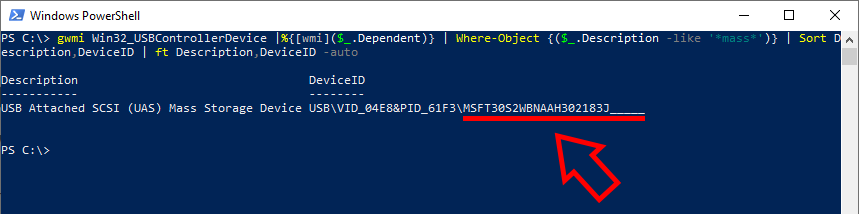
In the output, make sure the Description matches your drive. Copy the serial number.
⚠️ The serial number can be found after the last backslash “”\”” in the DeviceID string. Do not copy the Vendor ID (VID) nor Product ID (PID) ⚠️
-
Send the serial number to the ADF support team,
OR
Copy and paste it to the online form supplied to you to obtain your license file.Make sure to copy/paste that information and not just retyping it as some characters might not be what they look like (o and 0 for example).